I ran across a UI that looked interesting through a newsletter I get called "UI Movement" (https://uimovement.com/). The UI is pretty basic, it is a component that allows one to "schedule a demo" based on a date and time. You can view the original concept here (https://dribbble.com/shots/9357635-Schedule-Demo-Exploration). It looked like it would be a lot of fun to build and it was. I chose React to build this because I don't get to use it as much as I would like and I've not had a chance to play with "hooks" yet, so I took this opportunity to figure out what they were all about. Also I'm not very good at CSS so I resisted the temptation to pull in Bootstrap and tried to hand roll all of my styling. I did cheat a little and started with the HTML5 boilerplate which brings in a CSS reset (https://html5boilerplate.com/).
Step 1
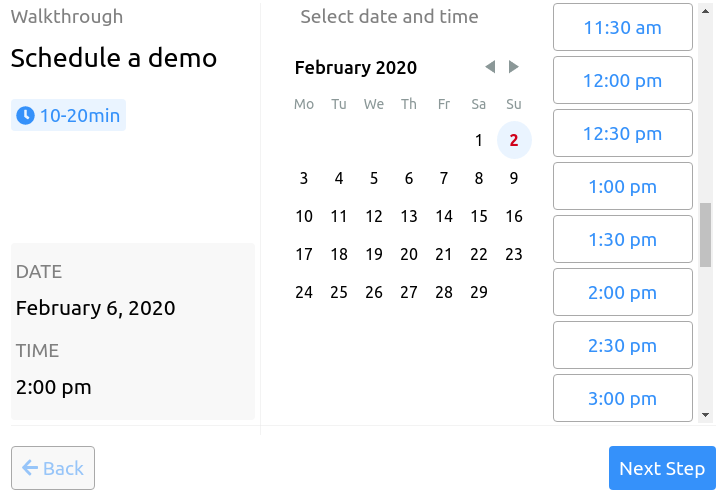
The other reason I chose react is because with Create React App, you can get all the things you need to begin your site up and running very quickly. This project is basically a 3 step wizard, Step 1 has a day picker and a time picker so that the user can quickly choose a date and time for the demo. There is a slight animation that displays schedule card when the date is picked. I attempted to recreate all the animations just as they were. The only problem I ran into on this page is the thin scroll-bar next to the time picker. I could not get it to work in Chrome but it seems to work in Firefox just fine. Both navigation buttons are grayed out until you choose both a date and time and then the "Next step" button enables to allow you to proceeded to the next step.
Step 2
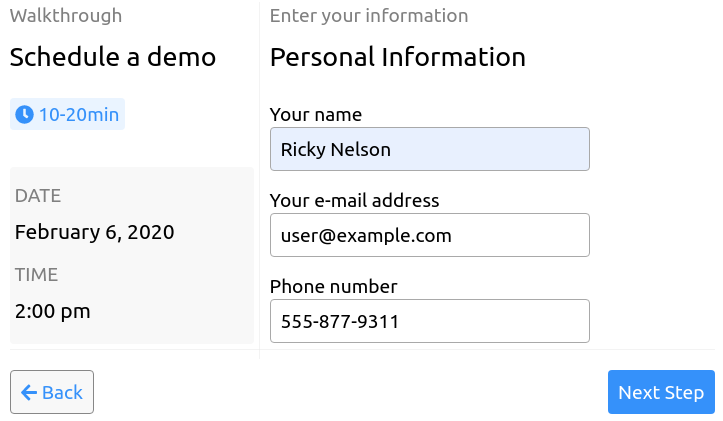
The next step is a form that prompts the user for name, email and phone number so that the scheduling information can be emailed to the user. I attempted to utilize a little bit of HTML5 form validation here but I didn't do much more than make each field mandatory with a slight bit of styling. The back button is enabled at this point but the next button is grayed out again until the form validation is complete at which point you can advance to the last and final step of the wizard.
Step 3
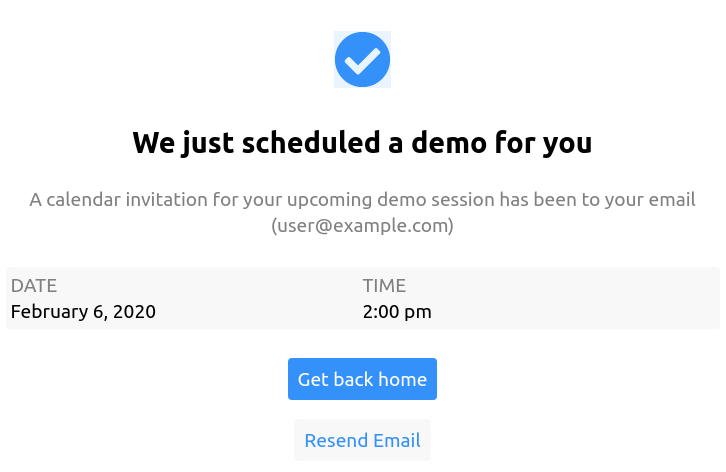
The final step is just a confirmation page that indicates the the user was sent an email concerning the scheduling details with some links to go to the home page or resend the email. I mostly utilized local state and passed it from parent to child, however there was one set of sibling components that needed to share some information so I utilized Redux for that.
Testing
I attempted to write some tests for everything as well since that is another area I need work in. I'm not happy with my progress here. There doesn't seem to be a way to test a form button "onClick" event. Jest doesn't seem to support "onSubmit" and when you click the button that seems to be the only thing it wants to do. Also I had to rework things a bit to get Redux out of the way for some tests. I would love to know how I can improve these so if you have any ideas please leave comments below.
You can find the project here: https://github.com/Zolmok/schedule-event.
Update: answering my own testing question
Nobody answered the question I asked above, so years later I'm
answering it myself. The problem was never that you can't test a
button that submits a form. It was that I was trying to fire the
button's onClick directly, when the thing that actually happens in a
browser is a click on a submit button causing the form to submit.
The fix is to test the way a user uses the page. With
React Testing Library
and its user-event
companion, you type into the fields and click the button, and the
form's onSubmit handler runs just like it would in a browser. Here
is a cut down version of the Step 2 form and two tests for it:
import { render, screen } from '@testing-library/react';
import userEvent from '@testing-library/user-event';

function ContactStep({ onNext }) {
  function handleSubmit(event) {
    event.preventDefault();
    const data = new FormData(event.target);
    onNext({ name: data.get('name'), email: data.get('email') });
  }

  return (
    <form onSubmit={handleSubmit}>
      <label>
        Name <input name="name" required />
      </label>
      <label>
        Email <input name="email" type="email" required />
      </label>
      <button type="submit">Next step</button>
    </form>
  );
}

test('clicking "Next step" submits the form', async () => {
  const user = userEvent.setup();
  const onNext = jest.fn();
  render(<ContactStep onNext={onNext} />);

  await user.type(screen.getByLabelText('Name'), 'Ricky');
  await user.type(screen.getByLabelText('Email'), 'ricky@example.com');
  await user.click(screen.getByRole('button', { name: 'Next step' }));

  expect(onNext).toHaveBeenCalledWith({ name: 'Ricky', email: 'ricky@example.com' });
});

test('an empty required field blocks the submit', async () => {
  const user = userEvent.setup();
  const onNext = jest.fn();
  render(<ContactStep onNext={onNext} />);

  await user.click(screen.getByRole('button', { name: 'Next step' }));

  expect(onNext).not.toHaveBeenCalled();
});
Both tests pass with Jest and its jsdom environment. The second one is
my favorite, because it checks the HTML5 required validation I
mentioned in Step 2 without any extra code. If you take required off
the inputs, that test fails.
Notice that neither test knows anything about Redux, state, or which
handler is attached to which element. That's also the answer to
having to rework things to get Redux out of the way: test the
component through what the user sees, and pass in a plain function
like onNext for the part that would normally talk to the store.
What I'd change
The one place I reached for Redux was a pair of sibling components that needed to share a value. Looking back, that was more than the job needed. Lifting that state up into their shared parent, or using React context if it has to travel further, would have done the same thing with a lot less code, and it would have made those tests easier to write too.
Related Posts
Subscribe to the newsletter
Get notified when I publish new posts. No spam, unsubscribe anytime.
By subscribing, you agree to our privacy policy.