I've had a backup script for years. It worked. It did exactly what I told it to do, which turned out to be both a strength and a problem.
The backup that wasn't
I have one of these Asustor Drivestor NAS units sitting on my network, and a script that uses Restic to back up all of my machines to it. Restic is a fantastic CLI backup tool, encrypted, deduplicated, fast. I set this up years ago and it ran faithfully every night via a systemd timer. No AI involved, no AI needed.
The problem was that "faithfully" is doing a lot of heavy lifting in that sentence. The script backed up files. That's all it did. It didn't manage retention. It didn't prune old snapshots. So over time it would quietly fill up the disk on my NAS, backups would start failing, and if I didn't happen to check, they could fail for months without me knowing. I'd built a backup system that was one missed check away from being useless.
I knew I should add retention policies. I knew I should set up monitoring. I knew I should verify restores. I just... didn't. Each of those things requires research, testing, and debugging, and I had gotten to "good enough" and moved on. That's the trap. Good enough works right up until it doesn't.
Letting AI go the extra mile
I wrote about this dynamic in my previous post on AI as a dev tool. One of the unexpected benefits of having a context-aware assistant is that you stop putting things off. The research-and-trial-and-error barrier drops to near zero.
So I pointed Claude Code at my backup script and asked it to review my strategy and suggest improvements. Within a session it had added a retention policy with automatic pruning. The script now runs restic forget after each backup with a policy of 7 daily, 4 weekly, and 6 monthly snapshots. Old snapshots get cleaned up automatically so the NAS doesn't fill up anymore. It also added pre-flight checks, SFTP connectivity tests, proper locking so two backups can't run at once, and log rotation. It took a simple "run restic and hope for the best" script and turned it into something I'd actually trust.
But the script improvements were just the beginning. I started asking it to do things I never would have bothered doing manually.
Log review. I'll ask it to check the backup logs, look for warnings or errors, and summarize what happened. It's found issues I would have missed entirely, little warnings buried in output that hint at permissions problems or paths that no longer exist.
Ignore list curation. It turned out I was backing up a ton of junk. The AI helped me analyze what was actually in my snapshots and build out a proper exclude list: node_modules, target, .cache, __pycache__, .venv. Less junk means faster backups and less wasted space on the NAS.
Restore verification. This is the big one. A backup is worthless if you can't restore from it. So periodically I ask it to pick three random files from the latest snapshot, restore them to /tmp, and do a hash comparison against the originals. Here's what that looks like:
| File | Type | Result |
|---|---|---|
ansible_collections/.../sandbox_inventory | Text (103 B) | Match |
flashreel/.../landing-page_branding.png | Binary/PNG (345 KB) | Match |
boost/.../message_file.hpp | Symlink | Match |
Text files, binaries, even symlinks — all verified byte-for-byte against the originals. If something doesn't match, I want to know about it now, not the day I actually need to recover.
Three machines, one workflow
I run this across three machines: my main Omarchy Linux box, a Mac Studio, and a generic Arch install on a mini PC. The AI will SSH into each one, run the backup, verify the logs, test a restore, and report back.
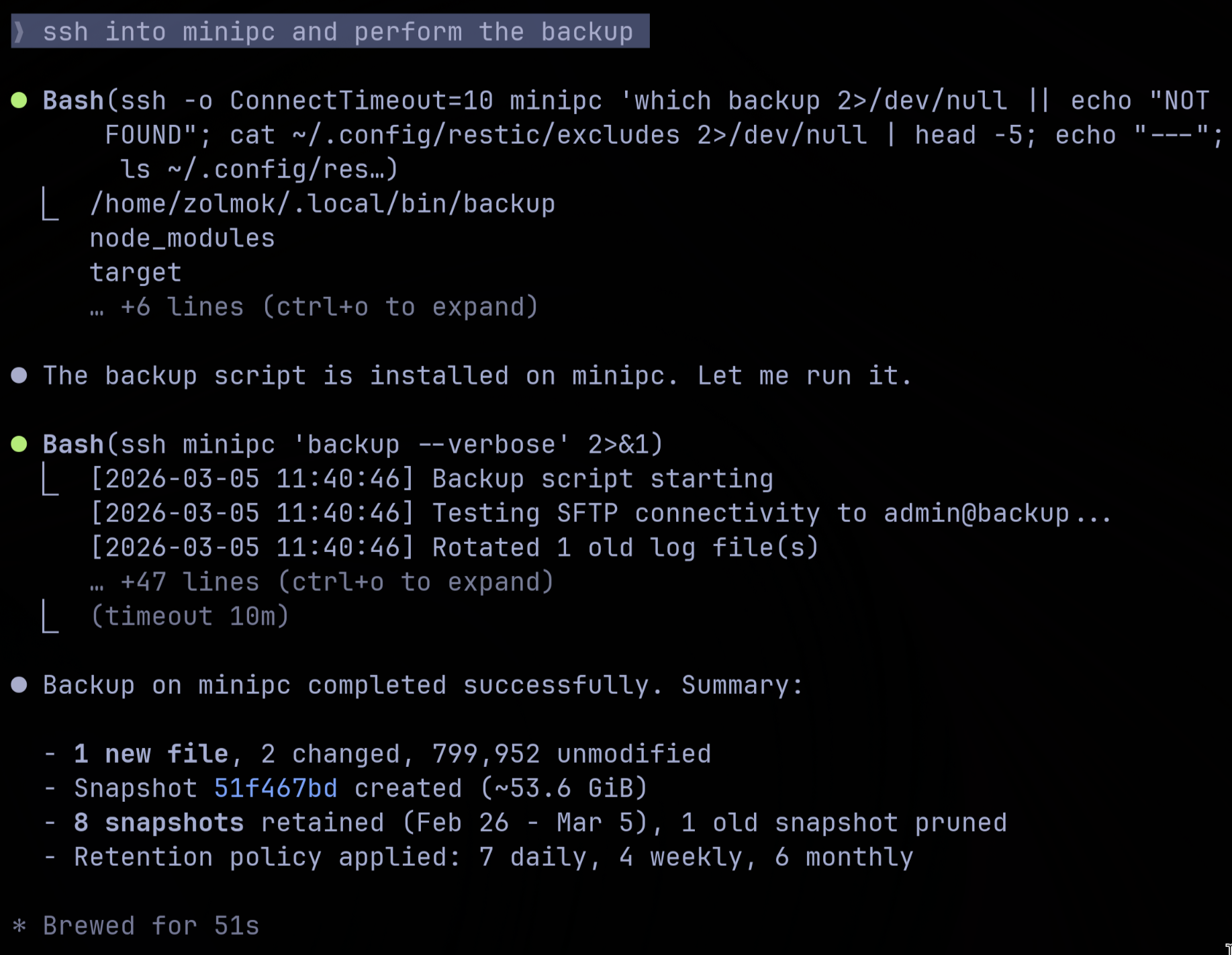
That's Claude Code SSH'd into my mini PC, running the backup, and reporting back with a summary: 1 new file, 2 changed, 799,952 unmodified. 8 snapshots retained, 1 pruned. It's the same workflow on each machine, adapted for whatever platform-specific quirks come up.
This is where it's uncovered a few permission errors that were silently causing problems. Files that weren't getting backed up because the script didn't have the right access, that sort of thing. Nothing catastrophic, but exactly the kind of issue that festers until the day you actually need your backups.
The verification habit
Here's what I think people aren't taking seriously enough about AI: verification.
I can task the AI to go the extra mile on things I would have left at "good enough." That's genuinely powerful. But the output still needs a human checking it. When it modifies my backup script, I read the diff. When it reports that restores verified successfully, I'll occasionally spot-check one myself. When it suggests changes to my exclude list, I review what's being excluded.
The temptation is to let the AI handle everything end to end and just trust that it worked. That's a mistake. AI is a force multiplier, not a replacement for understanding what's happening on your own systems. The moment you stop verifying is the moment you're in the same position as before, one missed check away from a problem you don't know about.
The takeaway
None of this is stuff I couldn't do on my own. I've been managing Linux systems for a long time. But every improvement required research, trial and error, and enough motivation to push past "good enough." The AI removes that friction. I still have to understand what's happening and verify the results, but the tedious parts, the researching, the scripting, the testing across multiple machines, that's where AI shines.
My backups are more robust now than they've ever been. And honestly, it feels good to finally have that nagging "I should really fix my backup strategy" item off the list.
Written by me, assisted by the AI.
Tags: #ai #claude #sysadmin #linux
Categories: #ai
Subscribe to the newsletter
Get notified when I publish new posts. No spam, unsubscribe anytime.
By subscribing, you agree to our privacy policy.